Introduction
If you think Zoho Books is only for creating invoices, you may be missing its real power. Yes, you can create invoices, record bills and expenses, and manage payments. But Zoho Books can do much more than basic accounting. It can help you manage your complete finance process in one place, from invoices and payments to expenses, banking, taxes, reports, reminders, approvals, and more.
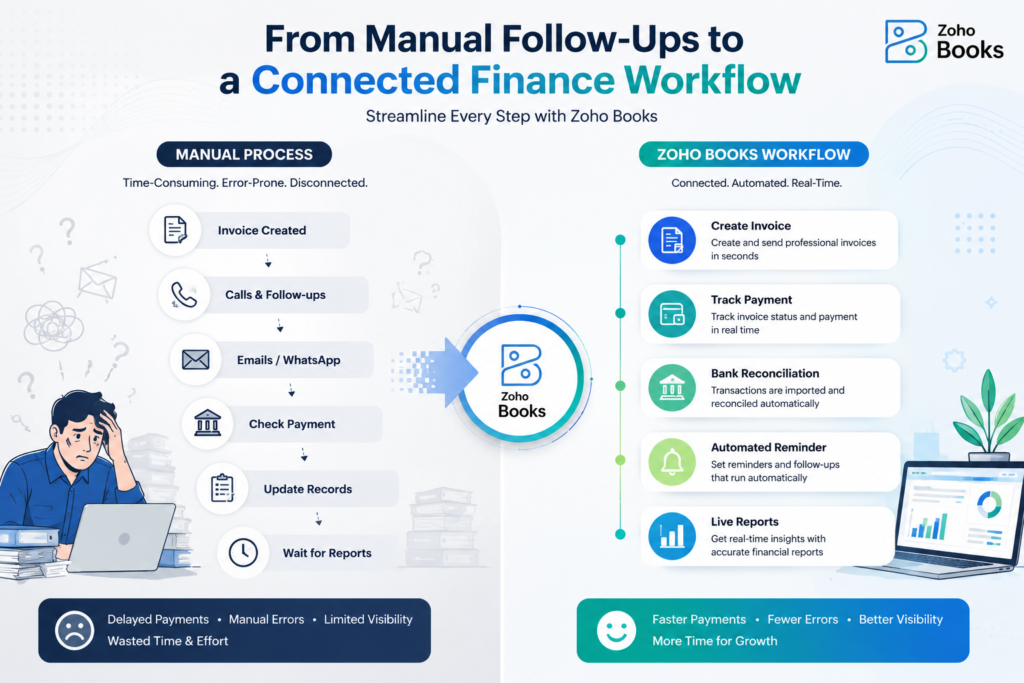
Think about what usually happens in many businesses. An invoice is created. Then someone follows up through calls, emails, or WhatsApp. Someone else checks whether the payment has arrived. The finance team updates the records, and finally, the business owner waits for a report. When every step is handled separately, the entire process can become slower and harder to manage.
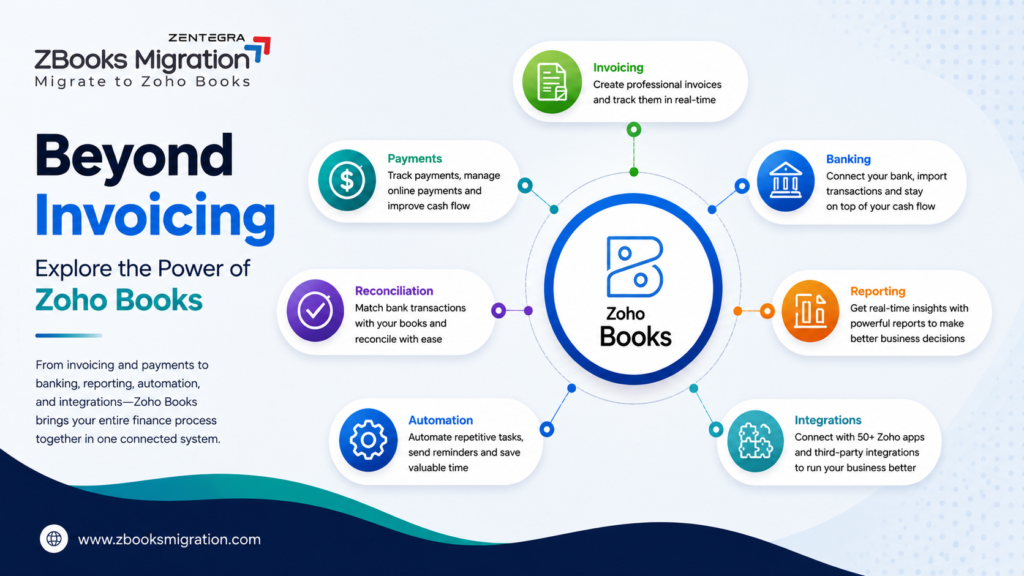
This is where Zoho Books features can make a real difference. Zoho Books helps bring these processes into a better flow. You can create invoices, track payment status, manage banking activities, access financial reports, automate routine tasks, and connect your finance process with other business applications. In this blog, we’ll explore the key Zoho Books features that make it more than just an accounting tool.
1. Zoho Books Invoicing Helps You Track What Happens After You Send an Invoice
Creating an invoice is only the first step in getting paid.
After sending it, you still need to know whether the customer has viewed it, whether the due date has passed, whether payment has arrived, and whether the amount has been recorded correctly.
This is where Zoho Books invoicing becomes more useful than a simple invoice generator.
Zoho Books allows businesses to create and send invoices, save them as drafts, monitor invoice status, record payments, and manage recurring invoices. When an invoice passes its due date, the system can mark it as overdue, while recorded payments update the invoice status accordingly.
Depending on your setup and plan, businesses can also use payment reminders and recurring invoicing to reduce repetitive follow-up work. Zoho’s official documentation also supports approval mechanisms for invoicing workflows. You can explore the full range of Zoho Books invoice management features on Zoho’s official website.
A typical workflow can look like this:
Create invoice → Send invoice → Track status → Send reminder → Receive payment → Update financial records
The important point is that the process does not stop once you click “Send.”
You can continue to monitor the movement from invoice to payment.
For a growing business, that can provide better visibility into outstanding receivables and reduce the need to manage every follow-up through separate calls, emails, or spreadsheets.
2. Zoho Books Bank Reconciliation Can Simplify Banking Work
Banking is another area where finance teams often spend a lot of time.
Someone may need to check the bank statement, compare transactions, find the matching accounting entry, investigate differences, and identify transactions that still need attention.
Doing this manually for a growing number of transactions can take time.
Zoho Books bank reconciliation helps bring banking data and accounting records closer together. Zoho Books can support bank feeds for available banks, while businesses can also manually import bank statements when required. Bank transactions can then be categorised, matched, and reconciled with business transactions.
Zoho also provides bank rules to help categorise transactions and features to help manage duplicate or unmatched entries. The exact availability of automatic bank feeds depends on the bank, connectivity provider, and authentication requirements.
The business benefit is simple: your team can spend less time moving between statements and accounting records.
Instead, they can focus more on reviewing exceptions and understanding cash movement.
3. Zoho Books Reporting Gives You Faster Financial Visibility
A business owner should not always have to wait for someone to manually prepare a report before understanding the financial position of the business.
Important questions often include:
- How much money are customers yet to pay?
- What bills are due?
- What does the current cash flow look like?
- Is the business profitable?
How are expenses changing?
- What tax-related information needs attention?
Zoho Books reporting helps businesses access financial information from the accounting data already recorded in the system.
Zoho Books offers more than 70 built-in reports covering areas such as profit and loss, cash flow, balance sheets, sales, expenses, purchases, inventory, projects, accounts, and taxes. Users can also customise selected reports and share or schedule them based on their reporting needs. You can explore Zoho’s official overview of 70+ built-in financial reports for more details.
This matters because delayed information can lead to delayed decisions.
When financial data is organised and reports are easier to access, business owners can review important numbers sooner and make decisions with a clearer view of the business.
4. Zoho Books Automation Reduces Repetitive Finance Work
Many finance tasks repeat every week or month.
The same invoice may need to be created again. Customers may need payment reminders. Internal approvals may need to follow a defined process. Routine notifications may need to go to the right people.
Handling every one of these activities manually can create unnecessary work.
Zoho Books automation helps businesses automate selected repetitive tasks and workflows.
Current Zoho Books automation capabilities include recurring invoices, bills and expenses, payment reminders, workflow rules, and triggered actions based on business conditions and processes. Zoho also highlights automation for tasks such as converting quotes to invoices and creating bills from purchase orders.
The practical benefits can include:
- Less repetitive manual work
- More consistent follow-ups
- Fewer missed reminders
- Better process visibility
More time for the finance team to focus on exceptions
Automation should not mean removing human control from every financial decision. Instead, it can help teams automate routine steps while keeping people involved where review and approval are important.
5. Zoho Books Integrations Connect Finance With Other Business Processes
Finance does not operate in isolation.
A sales team may create a customer opportunity. An inventory team may fulfil an order. A project team may track time and expenses. Eventually, many of these activities have a financial impact.
This is where Zoho Books integrations can become valuable.
Zoho Books supports integrations with other Zoho applications, payment gateways, partner banks, and selected third-party applications. Zoho’s current integration pages highlight connections with applications and services that can support payments and wider business workflows.
For businesses using the wider Zoho ecosystem, this can create connections between areas such as:
Sales → Inventory → Projects → Finance → Reporting
For example, a business may connect finance-related processes with applications such as Zoho CRM, Zoho Inventory, Zoho Projects, or Zoho Analytics, depending on its requirements and available integration setup.
The advantage is not simply having more software.
It is helping different parts of the business share relevant information instead of creating disconnected processes.
How These Zoho Books Features Work Together
The real strength of Zoho Books is not any single feature.
It is the way different finance activities can work together.
Imagine this workflow:
An invoice is created
↓
The invoice is sent to the customer
↓
The payment status is tracked
↓
A reminder is sent when required
↓
The customer makes the payment
↓
The bank transaction appears or is imported
↓
The transaction is matched and reconciled
↓
The financial reports reflect the updated information
This is why looking at Zoho Books only as an invoicing tool can be limiting.
The individual features become more useful when they support a complete financial process.
No Matter Where You're Migrating From, the Move Needs the Right Approach
Migrating to Zoho Books isn’t a one-size-fits-all process. The steps involved can differ depending on the accounting software your business currently uses and the type of data you need to move.
Whether you’re planning a Tally to Zoho Books migration, switching from Xero to Zoho Books, or moving from QuickBooks to Zoho Books, understanding your current setup is an important first step. From accounting records and opening balances to transactions, inventory, and existing workflows, each migration requires the right level of planning and validation.
You can explore the specific migration process for your current accounting platform:
Zoho Books Can Act as a Financial Control Centre
When configured around the needs of a business, Zoho Books can help bring several important activities into one environment.
These include:
Finance Area | How Zoho Books Can Help |
Invoicing | Create, send and track invoices |
Payments | Monitor payment status and collections |
Expenses | Record and manage business expenses |
Banking | Import or fetch available bank transactions |
Reconciliation | Match banking and accounting transactions |
Reporting | Review financial and operational reports |
Automation | Automate recurring and routine activities |
Integrations | Connect finance with other business systems |
When these features work together, Zoho Books can become more than a place to record transactions. It can support a connected approach to day-to-day financial management. For a broader understanding of how the platform supports business accounting, read our complete guide to Zoho Books for business accounting.
Zoho Books also offers India-specific capabilities related to GST workflows. Its India edition supports features such as GST-compliant invoicing, e-invoicing, e-way bills, tax reporting, and other GST accounting functions. Businesses should still confirm that their setup, eligibility, and filing process meet their specific compliance requirements.
So, the more important question is not:
Can my accounting software record transactions?
The better question is:
Is my accounting system helping me manage the entire financial process more effectively?
When Should You Consider Moving to Zoho Books?
If you currently use Tally, QuickBooks, Xero, or another accounting system, you may start looking at Zoho Books when your business needs better workflow support.
For example, you may want:
- More organised invoicing
- Better payment tracking
- Easier banking workflows
- Faster access to reports
- Greater automation
Better-connected business applications
However, moving to Zoho Books should not be treated as a simple export-and-import exercise.
Accounting data needs attention.
Your opening balances need to be accurate. Master data may need cleaning. Historical records need to be reviewed. The new Zoho Books setup should match the way your business operates.
Most importantly, your team needs to know how to use the system after the migration.
Why a Structured Zoho Books Migration Matters
A successful migration involves more than transferring data.
The right process usually involves assessing your existing records, preparing and mapping the data, configuring Zoho Books, importing the required information, validating the results, and preparing your team to use the new system. To understand this journey in more detail, see our complete 7-step Zoho Books migration process.
A structured approach may include:
Assessing the Current System
Review the existing accounting data and understand the business processes that the new setup needs to support.
Setting Up Zoho Books Properly
Configure the chart of accounts, taxes, users, workflows, and other settings according to business requirements.
Migrating the Required Data
Depending on the migration scope, this may include opening balances, customer and vendor master data, chart of accounts, and historical transactions.
Validating the Records
Imported data should be checked to ensure that balances and records are accurate.
Training the Team
A new system only delivers value when the people using it understand the correct processes.
How Zbooks Can Help You Move to Zoho Books
At Zbooks, our focus is not simply on moving data from one accounting platform to another.
We help businesses take a structured approach to Zoho Books migration.
Depending on your requirements, the process can include assessing your current accounting data, setting up Zoho Books, migrating opening balances and master data, transferring relevant historical records, validating the migrated information, and helping your team understand how to use the new system.
The goal is not just to complete a migration.
The goal is to help your business make effective use of the Zoho Books features available after the move.
Final Thoughts
The most useful Zoho Books features go far beyond creating an invoice or recording an expense.
Zoho Books can help businesses organise invoicing, track payments, manage banking activities, reconcile transactions, access financial reports, automate routine work, and connect finance with other business processes.
For businesses considering a move from Tally, QuickBooks, Xero, or another accounting platform, the migration itself also deserves careful planning.
Moving data is only one part of the journey.
The bigger goal is to build a finance workflow that helps your business operate with better visibility, consistency, and control.
Planning to migrate to Zoho Books? Zbooks can help you assess your current accounting system, plan the migration, configure Zoho Books, migrate the required data, validate records, and help your team get started with confidence. Contact our team to discuss your Zoho Books migration requirements.
Frequently Asked Questions (FAQ's)
Zoho Books includes features for invoicing, customer payments, expenses, bills, banking, bank reconciliation, financial reporting, workflow automation, integrations, inventory and other finance-related processes. Available features can vary by edition and plan.
No. While Zoho Books includes invoicing tools, it also supports banking, reconciliation, payables, expenses, reporting, automation, integrations, and other accounting workflows.
Yes. Zoho Books automation can support recurring transactions, payment reminders, workflow rules, notifications, and other routine activities, depending on the configured workflow and plan.
Yes. Zoho Books supports bank and credit card reconciliation by helping businesses import or fetch transactions, categorise entries, match them with accounting records, and reconcile them. Bank feed availability depends on the bank and connectivity setup.
Yes, businesses can plan a migration to Zoho Books from another accounting system. The right approach depends on factors such as data quality, opening balances, master data, historical transaction requirements, and the desired Zoho Books configuration.