For businesses in India, tax compliance is no longer just about calculating GST and submitting a return before the deadline. Businesses also need to maintain accurate invoices, classify transactions correctly, reconcile purchase data, track Input Tax Credit (ITC), and ensure that information reported across GST returns agrees with their books.
ZBooks helps bring these activities into one accounting workflow. Its India edition supports GST configuration, GSTR-1 and GSTR-3B filing, GSTR-2B reconciliation, GST reporting, and connections with the GST Network (GSTN). It also provides workflows around e-invoicing and other GST-related processes.
For businesses dealing with frequent transactions or complex GST requirements, this can reduce manual work and make GST compliance easier to manage. However, software does not replace professional review or the taxpayer’s responsibility to ensure that the information filed with the government is correct.
What Is GST and Tax Compliance?
Before looking at how Zoho Books manages GST, it helps to understand what GST and tax compliance actually mean.
What Is GST?
Goods and Services Tax (GST) is an indirect tax charged on the supply of goods and services in India. It replaced several central and state-level indirect taxes and created a more unified tax system.
GST generally includes Central GST (CGST), State GST (SGST), Union Territory GST (UTGST), and Integrated GST (IGST), depending on the nature and location of the transaction.
For businesses, GST involves more than collecting tax from customers. They must issue valid tax invoices, apply the correct tax treatment, maintain records, reconcile eligible Input Tax Credit (ITC), and report transactions through the applicable GST returns.
What Is Tax Compliance?
Tax compliance means meeting the tax-related obligations that apply to a business under Indian law. For a GST-registered business, this can include:
- Registering for GST when required
- Maintaining accurate accounting and tax records
- Issuing GST-compliant invoices
- Charging the appropriate GST
- Maintaining supporting documents
- Reconciling purchase and sales data
- Claiming eligible Input Tax Credit
- Completing GST return filing within the applicable deadlines
- Paying the correct amount of tax
Responding to discrepancies or notices when required
This is why GST compliance can become challenging as a business grows. More transactions, vendors, customers and GST records mean more information to review and reconcile.
Why Does Tax Compliance Software Matter?
Managing these activities manually can involve spreadsheets, separate reports and repeated data entry. Tax compliance software can help bring accounting records, GST calculations, reconciliation and reporting into a more connected workflow.
This is where Zoho Books can help. Instead of treating GST compliance as a separate activity at the end of each tax period, businesses can manage many GST-related processes alongside their regular accounting. Businesses that want to understand the broader platform can also explore how Zoho Books supports business accounting, including taxation, reconciliation, reporting and automation.
What GST and Tax Compliance Features Does Zoho Books Provide?
Zoho Books is designed to connect day-to-day accounting with several GST compliance activities. Businesses can configure GST settings, record taxable transactions, generate GST reports, reconcile GST data and use supported online filing workflows.
These capabilities form part of a broader set of Zoho Books features covering invoicing, reconciliation, reporting, automation and other financial workflows.
Here is a quick overview:
Compliance area | How Zoho Books helps |
GST configuration | Set up GSTIN, tax settings and applicable GST options |
GSTR-1 | Prepare and file outward-supply details |
GSTR-2B | Fetch and reconcile ITC-related data |
GSTR-3B | Prepare and file the summary GST return |
GST reconciliation | Match GSTN data with accounting records |
ITC management | Review purchase-side GST information |
e-Invoicing | Reconcile e-invoice data within the GSTR-1 workflow |
GST reporting | Review tax and return-related information |
Filing approvals | Add review and approval before filing |
Zoho Books allows businesses to enable online filing so they can pull and push relevant data to GSTN.
The underlying compliance requirements come from India’s GST framework, including the Central Goods and Services Tax Act, 2017 and the Integrated Goods and Services Tax Act, 2017 (IGST Act). The CGST Act covers areas such as ITC under Section 16, tax invoices under Section 31, outward supplies under Section 37, returns under Section 39, and tax payment under Section 49.
How Does Zoho Books Simplify GST Compliance?
A major benefit of using accounting software for GST is that the compliance process starts when you record a transaction, rather than only when a return is due.
A typical workflow looks like this:
Record transaction → Apply GST → Generate GST data → Reconcile → Review → File return
Businesses can extend this connected approach beyond tax reporting by using Zoho Books automation workflows for recurring accounting tasks, approvals and other repetitive processes. Zoho Books lets businesses configure GST settings for their organization and establish online filing settings for GSTN.
This matters because errors in tax compliance often begin with everyday accounting. An incorrect GSTIN, tax treatment, place of supply, invoice value or tax classification can eventually affect a return.
The CGST Act also places responsibility on the registered taxpayer for the correctness of information furnished through a GST practitioner or other filing process.
So, tax compliance software should be viewed as a tool that supports accurate processes—not as a replacement for accounting judgment.
How Does Zoho Books Handle GSTR-1?
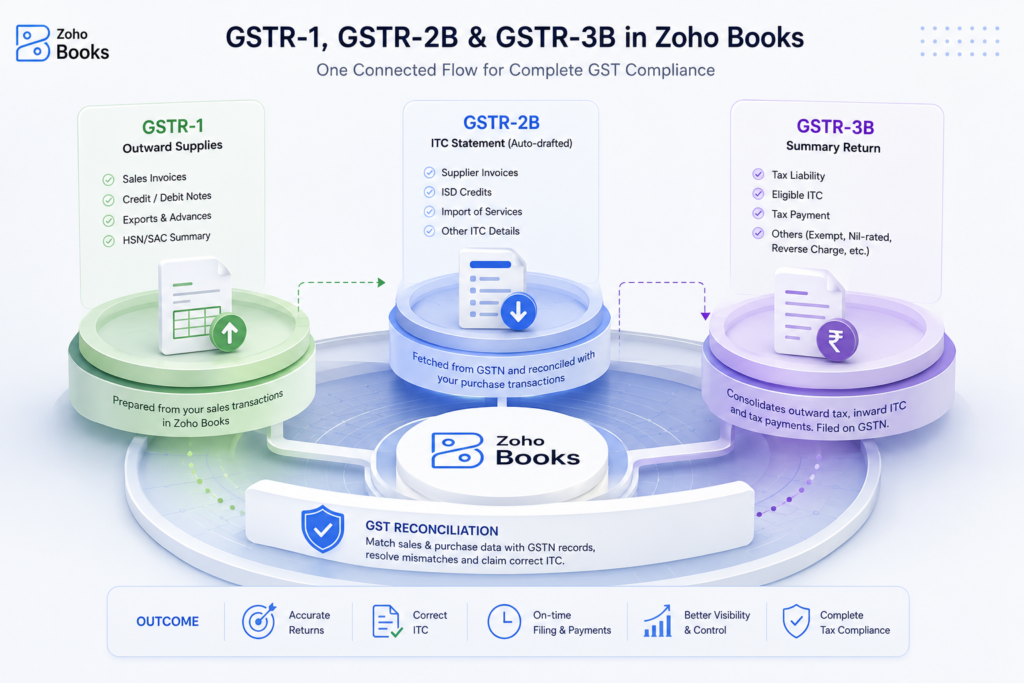
GSTR-1 reports outward supplies of goods and services. The GST Portal describes it as the statement of outward supplies furnished by registered taxpayers making outward supplies. It includes information such as invoice-level B2B supplies, applicable B2C supplies, credit and debit notes, exports, advances, amendments and HSN/SAC summaries, depending on the taxpayer and transaction type. Businesses can review the GSTR-1 requirements and filing details on the GST Portal.
This makes GSTR-1 an important part of GST return filing.
Zoho Books can prepare GSTR-1 information from the transactions recorded in the accounting system. Businesses can also push the relevant data to GSTN and complete filing through the supported Zoho Books workflow.
Before filing, businesses should review key information such as:
- Customer GSTINs
- Taxable values
- CGST, SGST and IGST
- Credit and debit notes
- HSN/SAC information
- Export or zero-rated transactions
Amendments to earlier transactions
Zoho Books also provides an e-invoice reconciliation workflow within GSTR-1. This helps avoid unnecessarily pushing transactions that have already been auto-populated through the Invoice Registration Portal.
That review step is important. Automation can organize and transfer data, but the business should still verify the information before submitting the return.
What About GSTR-2 and GSTR-2B Reconciliation?
This is an area where terminology can cause confusion.
GSTR-2 is not the current return that businesses should treat as a routine filing form. Zoho Books still provides legacy GSTR-2/GSTR-2A reconciliation documentation, but its current GST workflow focuses on GSTR-2B reconciliation for purchase-side ITC information. Zoho’s current FAQ states that the returns it can currently generate and file are GSTR-1 and GSTR-3B, while GSTR-2B is used for reconciliation.
How Does GSTR-2B Reconciliation Work?
GSTR-2B is an auto-drafted ITC statement generated from information reported by suppliers and other specified sources. Businesses should use the official GSTR-2B reconciliation guidance when reviewing the statement against their own records and books of accounts.
In Zoho Books, businesses can fetch GSTR-2B information from GSTN and compare it with purchase transactions recorded in their books.
The system can categorize transactions as:
- Matched
- Partially matched
- Missing in GSTN
- Missing in Zoho Books
- Reconciled
This makes GST reconciliation particularly useful before claiming ITC.
For example, if the vendor GSTIN, invoice number or invoice date in Zoho Books does not match the information uploaded by the supplier, the transaction may appear as missing or unmatched. Zoho Books provides actions to help users correct and reconcile these differences.
The purpose is not simply to make the screen show “matched.” Businesses should also determine whether the underlying transaction is eligible for ITC under the applicable GST provisions.
How Does Zoho Books Handle GSTR-3B?
GSTR-3B is a summary return used to declare GST liabilities and discharge those liabilities for the relevant tax period. Taxpayers can review the GSTR-3B filing requirements on the GST Portal, including the steps for declaring liabilities, reporting eligible ITC, paying tax and filing the return.
Zoho Books can prepare and file GSTR-3B through its GST filing workflow. It can also push relevant information to GSTN and help record GST payment information in the accounting system.
GSTR-3B brings together information related to areas such as:
- Outward taxable supplies
- Supplies liable to reverse charge
- Eligible ITC
- ITC reversals
- Exempt, nil-rated and non-GST inward supplies
Tax payable and payment details
The GST Portal now uses information from GSTR-1/1A and GSTR-2B to auto-populate relevant portions of GSTR-3B. However, the portal clearly states that taxpayers must verify the correctness of the values before filing.
That same principle applies when using Zoho Books: review first, file second.
GST Reconciliation and ITC Management in Zoho Books
For businesses with a large number of purchases, GST reconciliation can become one of the most time-consuming parts of compliance.
Zoho Books can pull supplier-reported information and reconcile it against purchase transactions. Its newer Invoice Management System also brings supplier invoice information into the workflow and categorizes transactions for review.
This can help finance teams identify issues such as:
- A supplier has not uploaded an invoice
- The invoice exists in GSTN but not in the books
- GSTIN details do not match
- Invoice values differ
- Tax amounts do not match
A transaction needs further review before ITC is considered
Under Section 16 of the CGST Act, ITC is subject to specific eligibility conditions. For example, the law links ITC eligibility to requirements concerning documentation, receipt of goods or services and other prescribed conditions.
Therefore, reconciliation should support a broader compliance review rather than become a simple automated “approve everything” process.
Other GST Compliance Features in Zoho Books
GST compliance extends beyond return filing.
Zoho Books also supports other processes that can form part of a business’s compliance workflow.
GST Reporting
Businesses can use GST-related reports to review tax information and prepare for filing and reconciliation.
E-Invoicing
E-invoicing under GST involves electronically registering specified invoices with the Invoice Registration Portal (IRP), which generates an Invoice Reference Number (IRN) and QR code. Businesses can review the GST e-invoicing mandate to understand the framework and applicability requirements.
E-Way Bills
Zoho Books also provides GST-related e-Way Bill functionality as part of its India edition. Its product information highlights e-invoices, e-Way Bills and delivery challans among its GST capabilities.
GST Filing Approvals
Businesses with accounting teams can also introduce an approval stage before GST returns are submitted, giving another opportunity to review the data.
How Can Zoho Books Support Complex Tax Compliance?
For a business with hundreds or thousands of transactions, manually moving accounting data into spreadsheets and then preparing GST returns can create unnecessary work.
Zoho Books can help by connecting the accounting records with GST workflows.
For example:
Sales transactions → GSTR-1
Purchase transactions → GSTR-2B reconciliation
Sales + purchase + ITC information → GSTR-3B
GSTN information ↔ Accounting records → GST reconciliation
The GST Portal itself provides comparison tools for checking tax liability reported in GSTR-1 against GSTR-3B and comparing ITC claimed in GSTR-3B with ITC reflected in GSTR-2A/GSTR-2B.
This shows why good tax compliance software should do more than generate a tax report. It should help businesses create a connected trail from the original accounting transaction to the final return.
Is Zoho Books a Tax Compliance Software?
Zoho Books can serve as an important part of a business’s tax compliance software stack because it combines accounting, GST configuration, reporting, reconciliation and supported return-filing workflows.
However, it would be misleading to suggest that simply using Zoho Books makes a business automatically compliant.
Businesses still need to:
Configure GST correctly.
Record transactions accurately.
Review tax treatment.
Reconcile relevant GST data.
Verify ITC eligibility.
Review returns before filing.
Meet applicable statutory deadlines.
Keep appropriate books and supporting records.
workflows, our complete guide to Zoho Books accounting covers areas such as GST compliance, e-invoicing, reporting, reconciliation and automation.The CGST Act covers record-keeping, returns, payment and self-assessment obligations, so software should support these responsibilities rather than replace them.
Conclusion
Effective tax compliance requires more than filing GST returns on time. Businesses need accurate transaction records, reliable GST calculations, proper documentation, regular GST reconciliation, and careful review of ITC and return data.
Zoho Books brings many of these activities into a connected accounting workflow. From GSTR-1 and GSTR-2B reconciliation to GSTR-3B filing and GST reporting, it can reduce repetitive work and give finance teams better visibility into their compliance process.
For businesses moving from another accounting system, however, the quality of the starting data matters just as much as the software itself. Incorrect GST mappings, opening balances or historical transactions can create problems after migration. Businesses moving from Tally can also review this Tally to Zoho Books migration guide to understand the migration process and key considerations.
If your business is planning a move to Zoho Books, ZBOOKS Migration can help with structured data migration, Zoho Books configuration and compliance-related setup. You can also contact the migration team to discuss your requirements.
Frequently Asked Questions ( FAQ's)
You can file your GST returns directly from Zoho Books by connecting your account to the GST portal via API integration.
Zoho
Setup Online Filing
Go to Settings in Zoho Books.
Select Taxes under Taxes & Compliance.
Choose Online Filing Settings and enter your GSTN Username and reporting period (monthly or quarterly).
Click Save.
Zoho
File GSTR-1 or GSTR-3B
Go to Filing & Compliance on the left sidebar and select GST Filing.
Choose the specific return period you want to file (such as GSTR-1 or GSTR-3B).
Click Push to GSTN or File Online to send your transaction data directly to the government portal.
Enter your PAN or generate the OTP sent to your registered mobile number.
Verify the OTP and click File Now to complete the submission.
Click Mark as Filed in Zoho Books once the Application Reference Number (ARN) is generated.
Yes, Zoho Books offers a free plan for GST-registered businesses in India with an annual turnover of less than ₹1.5 crore.
- Zoho
Free Plan Details for GST Compliance
Eligibility: Available for businesses with a turnover under ₹1.5 crore (in partnership with the GSTN network). For non-GST registered businesses, the general free tier applies to those with a turnover under ₹25 lakh. - Zoho: Core Features: Create GST-compliant invoices, generate GST reports, and handle basic accounting.
- Zoho
Filing Returns: File GST returns directly from the platform. - Zoho
User Limits: The free plan typically supports 1 user and core accounting needs, though certain advanced features or higher inventory volumes may require a paid upgrade.
- PrecisionTech: Most users on Reddit agree that the free version handles basic GST compliance and return submissions well, though it lacks advanced inventory management capabilities on the free tier.
Yes, Zoho Books includes full-featured invoicing as a core part of its online accounting software platform. You can use it to create, customize, and send professional invoices, accept online payments, and automatically track your financial records.
- Zoho: Invoicing Features
Create and Personalize: Build custom invoices with your own logo, colors, and item lists, or convert estimates directly into invoices.
Automate Billing: Set up recurring invoices for repeat customers and schedule automatic payment reminders.
Accept Payments: Connect with major online payment gateways like Stripe or PayPal to let clients pay you digitally.
Track Status: Monitor whether an invoice is sent, viewed, paid, or overdue in real time.
To do GST compliance, you must register your business, issue proper tax invoices, reconcile your input tax credits, and file periodic returns on time.
- ProfitBooks
Key Steps for GST Compliance
Get Registered: Obtain a unique Goods and Services Tax Identification Number (GSTIN) if your annual business turnover crosses the legal threshold. - Bajaj Finserv : Issue Tax Invoices: Create bills that include both parties’ GSTINs, sequential invoice numbers, correct HSN/SAC codes for items or services, and a clear tax breakdown.
- PayGlocal: File Periodic Returns: Submit your outward supplies via GSTR-1 and summary returns via GSTR-3B according to monthly or quarterly deadlines.
Reconcile Input Tax Credit (ITC): Match your purchase records and claims with the auto-generated GSTR-2B statement every month to ensure accurate tax offsets.
- Pay Tax Dues: Deposit any remaining net tax liability through the official government portal before the due date to avoid penalties or interest.
- Alp Consulting: Maintain Records: Keep all financial books, invoices, and electronic records safely stored for at least 6 years.