Choosing accounting software is not simply about comparing features. For an Indian business, the right platform needs to handle accounting, GST, invoicing, inventory, banking, reporting, compliance, and day-to-day financial operations without creating unnecessary work.
That is why the Tally vs Zoho Books comparison matters.
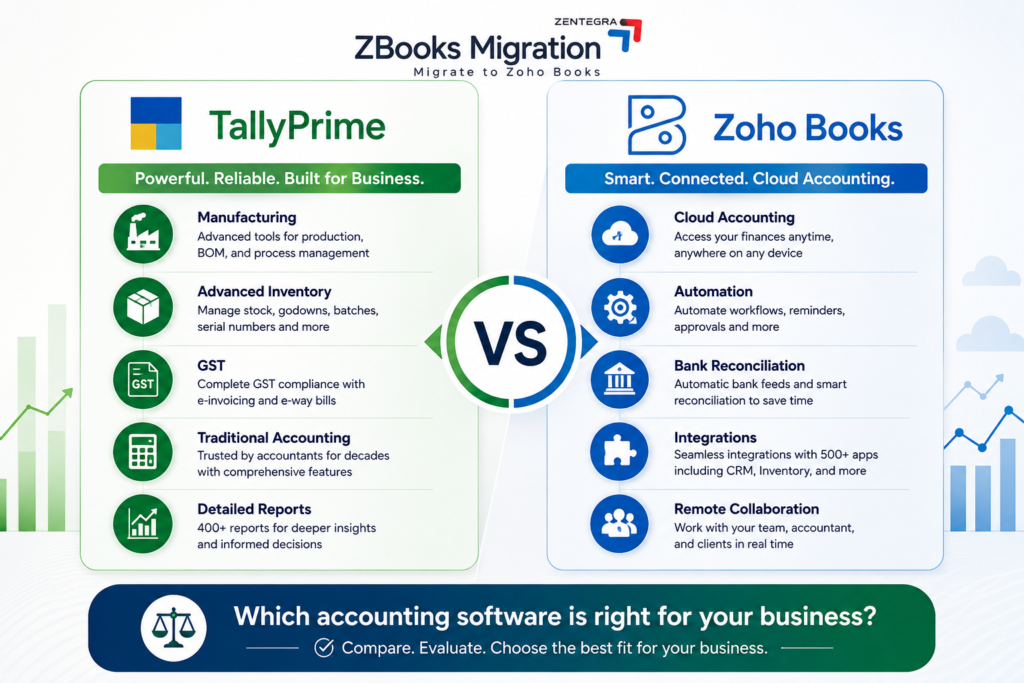
TallyPrime is widely suited to businesses that rely on established accounting workflows, detailed inventory, and manufacturing. Zoho Books takes a cloud-first approach, focusing on automation, collaboration, online banking, integrations, and accessibility.
Quick answer: Choose TallyPrime if your business depends heavily on manufacturing, complex inventory, or established Tally-based accounting processes.
Choose Zoho Books if you prioritize cloud accounting, automation, remote collaboration, banking integration, and connected business applications.
The better option depends on how your business operates today and what you expect it to need as it grows.
Quick Comparison: Tally vs Zoho Books
Feature | TallyPrime | Zoho Books |
Accounting | Strong | Strong |
GST & Compliance | Yes | Yes |
Inventory | Advanced | Available; advanced through higher plans/ecosystem |
Manufacturing | Strong | Better suited to accounting-led operations |
Cloud Access | Available through remote/cloud options | Cloud-first |
Bank Reconciliation | Supported | Automated feeds and reconciliation |
Automation | Strong accounting workflows | Extensive workflow automation |
Reporting | Extensive | Customizable reports and analytics |
Mobile Access | Available | Web and mobile |
Integrations | APIs and connected services | Broad cloud ecosystem |
Best For | Manufacturing and inventory-heavy businesses | SMEs, startups and connected operations |
What is Tally?
Tally is business management and accounting software used for accounting, invoicing, GST, inventory, banking, payroll, and financial reporting.
Its strength is particularly visible in businesses that have complex inventory requirements or manufacturing processes. Features such as stock management, multiple godowns, bill of materials, production workflows, and detailed accounting make TallyPrime relevant to manufacturers, traders, distributors, and businesses with experienced accounting teams.
Tally also offers flexible licensing, including Silver for single-PC use and Gold for multi-user access. Its current India pricing starts at ₹750 per month for Silver, while annual and lifetime options are also available. Prices are subject to 18% GST.
TallyPrime also offers flexible licensing, including Silver for single-PC use and Gold for multi-user access. Its current India pricing and licensing options include monthly, annual, and lifetime options. Prices are subject to 18% GST.
What is Zoho Books?
Zoho Books is cloud accounting software for managing invoices, expenses, banking, inventory, GST, reporting, payments, and financial operations. Its accounting software features cover accounting automation, banking, reporting, collaboration, and other financial workflows.
Because it is designed around online access, businesses can give owners, accountants, and authorized employees access to financial information without depending on a single office computer. Businesses evaluating the benefits of this model can also explore our guide to cloud accounting for small businesses to understand how cloud-based accounting can improve accessibility, collaboration, and financial visibility.
Zoho Books also connects with other applications for CRM, inventory, payments, projects, analytics, and e-commerce. Its India plans currently range from a free plan to Standard, Professional, Premium, Elite, and Ultimate. The Standard plan starts at ₹749 per organization per month when billed annually, while higher plans add capabilities such as payroll, advanced inventory, customization, and analytics.
TallyPrime vs Zoho Books: Feature-by-Feature Comparison
Accounting, GST and Compliance
Both platforms support the core accounting and GST requirements expected by Indian businesses. TallyPrime supports GST accounting, e-invoicing, e-way bills, and statutory reporting. Zoho Books also provides GST reports and filing capabilities along with e-invoicing and related compliance workflows. Businesses should verify the latest requirements through official GST compliance guidance before making compliance-related decisions.
Inventory and Manufacturing
This is one of the clearest differences between the two platforms.
TallyPrime is particularly strong for businesses with complex inventory and manufacturing requirements. It supports detailed stock management, multiple godowns, batches, manufacturing workflows, and Bill of Materials. Businesses can review Tally’s inventory and manufacturing capabilities when evaluating whether the platform fits their operational requirements.
Zoho Books provides inventory management, while businesses requiring advanced warehouse management, batch tracking, serial numbers, composite items, shipments, and other advanced inventory capabilities can use the higher Zoho Books tiers and Zoho Inventory ecosystem.
Choose TallyPrime when manufacturing and complex inventory are central to your operations.
Choose Zoho Books when accounting is the primary requirement and inventory needs to connect with a wider cloud-based business system.
Banking and Bank Reconciliation
Banking is another important consideration when comparing Tally vs Zoho Books.
TallyPrime supports banking and reconciliation as part of its accounting workflow.
Zoho Books places greater emphasis on connected banking. Its plans include banking and reconciliation features, helping businesses import transactions, match entries, and manage bank-related accounting processes.
If your finance team spends significant time matching bank transactions and managing repetitive accounting work, automation can become an important deciding factor.
Automation and Integrations
Zoho Books has a strong advantage for businesses looking to connect accounting with other applications.
Businesses can automate recurring invoices, payment reminders, workflows, approvals, and other repetitive processes. For a deeper look at how these capabilities can reduce manual accounting work, see our Zoho Books Automation Guide. Zoho Books can also work with applications across the wider Zoho ecosystem and other connected business tools.
TallyPrime also supports connected services, data exchange, banking, GST workflows, and integration options.
The practical difference is this:
TallyPrime is strong when accounting is at the center of the workflow. Zoho Books is attractive when accounting needs to connect with the rest of the business.
Reporting and Analytics
TallyPrime is known for its extensive accounting and business reporting capabilities, making it suitable for businesses that depend heavily on detailed financial, inventory, statutory, and management reports.
Zoho Books provides financial, sales, purchase, inventory, banking, tax, and other reports, with customization and higher-tier analytics capabilities. The Ultimate plan adds advanced business intelligence and visualization capabilities.
So, TallyPrime may be preferable when extensive traditional accounting reports are the priority, while Zoho Books can be more suitable for businesses that want customizable reports and connected analytics.
Cloud Access, Security and Collaboration
TallyPrime is traditionally associated with desktop accounting, but modern TallyPrime also provides remote and cloud-related access options depending on the setup.
Zoho Books is fundamentally designed as a cloud accounting platform. This makes it convenient for businesses with remote teams, multiple locations, or owners who need access to financial information while away from the office.
Zoho Books also provides user permissions and security controls for managing access to financial data. Its official documentation states that transactions are protected using measures such as two-factor authentication and SSL encryption.
TallyPrime vs Zoho Books: Pricing
Pricing should be compared based on the number of users, features required, and the long-term operating model.
TallyPrime currently starts at ₹750 per month for Silver, with a ₹8,100 annual option and ₹22,500 lifetime option before GST. Gold starts at ₹2,250 per month for multi-user requirements.
Zoho Books has a free plan for eligible small businesses, while paid annual plans currently start at ₹749 per organization per month for Standard, ₹1,499 for Professional, ₹2,999 for Premium, ₹4,999 for Elite, and ₹7,999 for Ultimate. Zoho Books’ current India pricing should be checked before purchasing because plans, limits, and pricing can change.
The cheapest option is not automatically the best option. Compare the total cost of users, additional applications, inventory requirements, payroll, integrations, and implementation before deciding.
Tally vs Zoho Books: Which Is Better for Your Business?
Choose TallyPrime if your business:
- Relies heavily on manufacturing
- Has complex inventory requirements
- Uses established Tally accounting workflows
- Has an experienced Tally-based finance team
- Needs extensive traditional accounting reports
Requires strong offline-oriented accounting workflows
Choose Zoho Books if your business:
- Wants cloud-first accounting
- Has remote or distributed teams
- Needs automated banking and reconciliation
- Wants accounting connected with CRM and other applications
- Runs a startup, agency, consultancy, or service business
- Wants mobile access and online collaboration
Plans to build a connected digital business ecosystem
Can Zoho Books Replace TallyPrime?
For many small and medium businesses, Zoho Books can replace TallyPrime when the primary requirements are accounting, GST, invoicing, banking, reporting, automation, and collaboration.
However, switching should not be based on the assumption that newer software is automatically better.
A manufacturing company with complex production and inventory workflows may find TallyPrime more suitable. A service business struggling with manual reconciliation, remote access, disconnected applications, or repetitive accounting tasks may benefit more from Zoho Books.
The right question is not simply, “Which software is better?”
It is:
Which platform handles the workflows your business actually depends on?
If your business has decided that Zoho Books is the better fit after comparing both platforms, a structured Tally to Zoho Books migration can help you transition your accounting data while minimizing disruption to your daily operations. Explore our Tally to Zoho Books migration services
Tally to Zoho Books Migration: What Should You Know?
Businesses that choose Zoho Books after comparing the two platforms may need a Tally to Zoho Books migration.
Depending on the source data and migration approach, businesses may need to move:
- Customers and vendors
- Chart of accounts
- Opening balances
- Items and inventory
- Sales and purchase invoices
- Payments and receipts
- Credit and debit notes
- Historical accounting records
Before starting Tally to Zoho Books data migration, clean the source data, map accounts and items, select a suitable cutover date, validate opening balances, and test the migrated records.
A structured migration process can reduce manual data entry and help ensure that accounting records and reports remain accurate after moving to Zoho Books.
For businesses that need support beyond data transfer, our Zoho Books Migration Services Guide explains the broader migration process, including data validation, reconciliation, implementation, testing, and post-migration support.
Who Should Choose Tally?
Tally is ideal if your business:
- Has complex manufacturing operations
- Requires advanced inventory control
- Has an experienced accounting team
- Operates primarily from one location
- Prefers desktop software
Who Should Choose Zoho Books?
Zoho Books is perfect if you:
- Run a startup or SME
- Need remote accounting access
- Want workflow automation
- Manage multiple users
- Need integrated business software
- Prefer cloud-based accounting
Which Is Better for Growing Businesses?
Growth can change what a business expects from its accounting software.
As a company expands, it may need:
- Additional users
- Better financial visibility
- More integrations
- Automated workflows
- Multi-location support
- Inventory controls
- Advanced reporting
Stronger collaboration
Zoho Books can be attractive to businesses that want accounting to connect with a broader cloud-based business environment. Its plans include capabilities ranging from core accounting and GST to inventory, advanced analytics, and business intelligence.
TallyPrime can remain a strong choice for growing businesses where accounting, inventory, manufacturing, and established financial workflows continue to be the main priorities.
Growth does not automatically mean a business needs to switch software.
Why Businesses Are Moving from Tally to Zoho Books
Many businesses started with Tally years ago but now require flexibility and automation.
Common reasons for Tally to Zoho Books migration include:
- Remote team collaboration
- Cloud accessibility
- Better automation
- Faster GST workflows
- Integrated CRM and business applications
- Mobile accounting
- Automatic bank reconciliation
- Reduced manual data entry
Tally to Zoho Books Data Migration: What Can Be Migrated?
Professional Tally to Zoho Books data migration services can transfer:
- Customers
- Vendors
- Chart of Accounts
- Opening balances
- Items
- Inventory
- Sales invoices
- Purchase invoices
- Payments
- Receipts
- Credit notes
- Debit notes
Proper validation ensures financial reports remain accurate after migration.
Benefits of Professional Tally to Zoho Books Migration
Instead of manually entering years of accounting records, businesses choose expert migration services for:
- Zero data loss
- Faster implementation
- Data validation
- Reduced downtime
- Accurate opening balances
- Secure migration process
With experienced migration specialists, businesses can move to Zoho Books with confidence and continue operations without interruption.
When Should You Choose Zoho Books?
Zoho Books may be the better option when your business prioritizes:
- Cloud-first accounting
- Remote access
- Multi-user collaboration
- Automated financial workflows
- Online banking and reconciliation
- Integration with other business applications
- Mobile accounting
A connected digital ecosystem
Businesses should still evaluate their accounting, inventory, compliance, and reporting requirements before making a final decision.
If your business has decided that Zoho Books is a better fit after comparing the two platforms, professional Tally to Zoho Books migration services can help you plan the transition while maintaining the accuracy of your accounting records.
Tally vs Zoho Books: Final Verdict
There is no universal winner in the Tally vs Zoho Books comparison.
TallyPrime is a strong choice for businesses that prioritize manufacturing, complex inventory, established accounting workflows, and extensive traditional reporting.
Zoho Books is a strong choice for businesses that prioritize cloud accounting, automation, remote collaboration, banking, integrations, and connected business operations.
Before choosing, compare your actual accounting workflows, inventory requirements, GST processes, reporting needs, number of users, and future growth plans.
If you are still evaluating whether your business is ready to move from Tally to Zoho Books, you can contact our migration experts to discuss your accounting environment, data requirements, and transition needs before getting started. Contact our migration experts
If Zoho Books fits your requirements and you are currently using Tally, the next step is to plan your Tally to Zoho Books migration carefully so your accounting data, balances, and business records remain accurate throughout the transition.
Frequently Asked Questions
The best accounting software depends on your business requirements. Tally is ideal for businesses that need advanced inventory management, manufacturing features, and offline desktop accounting. Zoho Books is better for startups, SMEs, and growing businesses that require cloud access, workflow automation, GST compliance, and seamless integration with other business applications. If you value remote collaboration and automation, Zoho Books is the better choice.
The three most popular accounting software solutions are:
Zoho Books – Best for cloud accounting, automation, GST compliance, and business integrations.
TallyPrime – Best for traditional accounting, inventory management, and manufacturing businesses.
QuickBooks (International Version) – Popular among freelancers and small businesses for its user-friendly interface and financial reporting capabilities.
The right software depends on your business size, industry, and accounting requirements.
Yes. Businesses can migrate relevant accounting and business data from Tally to Zoho Books after properly preparing, mapping, importing, and validating the data.
Yes. Zoho Books offers a free plan for eligible micro businesses and multiple paid plans for businesses with increasing accounting, inventory, automation, and reporting requirements.
Final Thoughts
The Tally vs Zoho Books decision ultimately depends on how your business operates.
TallyPrime remains a strong option for businesses that value established accounting workflows, inventory management, manufacturing capabilities, and an experienced Tally-based finance function.
Zoho Books is a compelling option for businesses that want cloud accounting, remote collaboration, automation, integrated applications, and a more connected digital finance environment.
Instead of asking which software is universally better, identify what your business needs today and where you expect those requirements to go in the future. That approach will help you choose between Tally or Zoho Books based on business value rather than simply comparing feature lists.
If you have decided that Zoho Books is the right fit for your business and need help planning the transition from Tally, contact our team to discuss your accounting requirements and migration needs.