
Planning a Zoho Books Migration from QuickBooks? Understanding the migration limitations before you begin can save your business significant time, effort, and post-migration corrections.
While a QuickBooks to Zoho Books Migration allows businesses to transfer customers, vendors, invoices, bills, payments, and other financial records, not every piece of data moves seamlessly between the two systems. Differences in account structures, inventory handling, tax configurations, transaction numbering, and custom workflows can impact the migration process.
The good news is that most businesses can complete a successful Zoho Books Migration with proper planning and validation. By understanding these limitations beforehand, you can avoid reporting discrepancies, maintain data accuracy, and ensure a smoother transition to Zoho Books.
In this guide, we’ll explore the most common challenges associated with Zoho Books Data Migration, what data can be transferred, and the steps you can take to minimize migration issues.
Understanding QuickBooks to Zoho Books Migration
A QuickBooks Online to Zoho Books Migration involves transferring accounting and financial data from QuickBooks into Zoho Books. The migration process helps businesses centralize financial management while leveraging Zoho Books’ automation, reporting, and integration capabilities.
Businesses can also review the official Zoho Books migration documentation for platform-specific migration requirements and supported data types.
What Data Can Be Migrated?
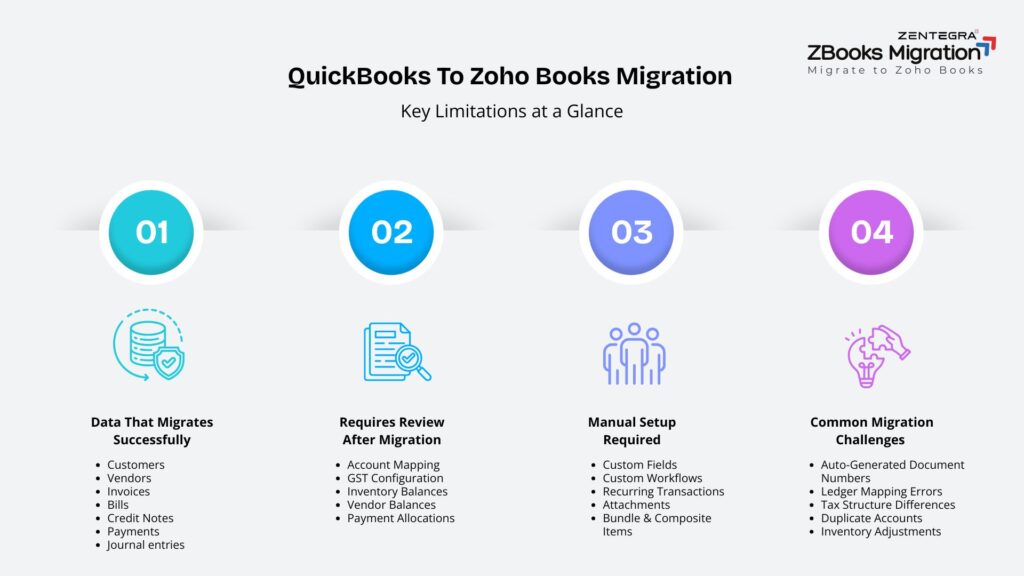
Most Data Migration to Zoho Books projects support the transfer of:
- Customers
- Vendors
- Chart of Accounts
- Products and Services
- Invoices
- Bills
- Credit Notes
- Purchase Orders
- Payments
- Journal Entries
Expenses
These records form the foundation of a successful Zoho Books Migration, allowing businesses to continue operations with minimal disruption.
Why Some Data Cannot Be Migrated Automatically
QuickBooks and Zoho Books use different accounting frameworks, database structures, and transaction logic. As a result, certain fields, workflows, and system-generated records may not transfer exactly as they appear in QuickBooks.
For example, custom configurations, tax treatments, inventory structures, and document numbering systems often require adjustments after migration.Lorem ipsum dolor sit amet, consectetur adipiscing elit. Ut elit tellus, luctus nec ullamcorper mattis, pulvinar dapibus leo.
Common QuickBooks to Zoho Books Migration Limitations
Understanding the limitations of Zoho Books Data Migration helps businesses prepare realistic expectations before importing data.
Many of these limitations are avoidable when businesses understand the most common Zoho Books migration challenges before beginning the migration project.
Custom Fields and Custom Workflows
Custom fields and workflows created in QuickBooks may not be imported automatically during a QuickBooks to Zoho Books Migration.
Businesses that rely heavily on customized approval workflows, transaction templates, or industry-specific configurations may need to recreate these settings manually in Zoho Books.
Transaction Numbering Differences
Zoho Books requires specific document numbering formats.
If invoices, estimates, bills, journals, purchase orders, or credit notes do not contain mandatory document numbers, Zoho Books automatically generates them during migration.
Examples include:
- QB-INV-1 for invoices
- QB-BILL-1 for bills
- QB-JN-1 for journals
QB-PO-1 for purchase orders
This can create numbering differences that should be reviewed after migration.
Historical Audit Trails
Certain audit logs, activity histories, and historical tracking records available in QuickBooks may not be migrated.
While core transaction data is preserved during Zoho Books Migration, businesses should not expect every historical system activity record to transfer.
Attachments and Supporting Documents
Attachments linked to transactions may require separate handling during migration.
Businesses should review all supporting documents and ensure critical files are stored securely after migration.
Limitations Related to Financial Transactions
Journal Entries
Journal migration requires special attention.
Zoho Books imports journals in Published status by default. Additionally, tax-related entries are often added as separate line items under tax accounts such as:
- Input CGST
- Input SGST
Input IGST
Complex journals involving Accounts Receivable, Accounts Payable, and bank accounts may be split into multiple journals during migration.
Recurring Transactions
Recurring invoices and recurring bills often require manual recreation after the QuickBooks Online to Zoho Books Migration is completed.
Businesses should review all recurring transaction schedules before going live.
Partially Paid Transactions
Invoices and bills with associated payments generally migrate successfully, but payment allocations should always be verified after migration.
Deleted and Voided Transactions
Inactive customers, vendors, and items from QuickBooks are imported as active records with a “(Deleted)” tag.
Businesses should identify these records and manually mark them inactive after migration.
Chart of Accounts and Account Mapping Challenges
Account Type Differences
Certain account categories are treated differently between QuickBooks and Zoho Books.
For example:
Account Name | QuickBooks Type | Zoho Books Type |
Interest Income | Other Income | Income |
Inventory Asset | Other Current Asset | Stock |
Undeposited Funds | Other Current Asset | Cash |
These differences can impact financial reporting after Data Migration to Zoho Books.
Ledger Mapping Issues
Account mapping plays a critical role in every Zoho Books Migration.
Incorrect ledger mapping can lead to:
- Trial Balance mismatches
- Balance Sheet discrepancies
- Profit & Loss inaccuracies
Tax reporting issues
Businesses should carefully review mapped accounts before finalizing migration.Lorem ipsum dolor sit amet, consectetur adipiscing elit. Ut elit tellus, luctus nec ullamcorper mattis, pulvinar dapibus leo.
Duplicate Accounts
If QuickBooks accounts share names with default Zoho Books accounts, they may not be imported.
Cleaning duplicate accounts before migration helps reduce confusion and improves reporting accuracy.
Inventory Migration Limitations
- Inventory Valuation Differences : Inventory valuation methods and stock tracking structures may differ between QuickBooks and Zoho Books. Businesses should verify opening stock values after migration.
- Bundles and Composite Products : Bundle items in QuickBooks are only imported as Composite Items when Zoho Inventory is enabled. Understanding how composite products work in Zoho Inventory can help businesses prepare inventory records before migration. Refer to the Zoho Inventory composite items documentation for additional guidance.
Additionally, service-only bundles may not be imported. - Inventory Adjustments : Inventory balances, stock movements, and item configurations should be reviewed after migration to ensure accuracy.Lorem ipsum dolor sit amet, consectetur adipiscing elit. Ut elit tellus, luctus nec ullamcorper mattis, pulvinar dapibus leo.
Tax and Compliance Considerations
- Tax Mapping Requirements : Tax settings often require additional verification after a QuickBooks to Zoho Books Migration.
GST-related taxes may be imported as separate tax account entries rather than appearing exactly as they did in QuickBooks. - Tax Group Differences : QuickBooks and Zoho Books use different tax structures.
This can affect:
- GST calculations
- Tax reporting
Reverse charge transactions
Multi-Tax Transactions : Transactions containing multiple tax treatments may require manual review to ensure compliance and accuracy.
Businesses operating in India should also verify current GST compliance requirements to ensure tax configurations remain accurate after migration.
Customer and Vendor Data Challenges
Duplicate Contacts
Duplicate customer and vendor records should be cleaned before migration.
Doing so reduces data inconsistencies and improves reporting.
Missing Contact Information
Incomplete customer or vendor records may affect transaction imports and tax reporting.
Customer Payment History Verification
After Zoho Books Data Migration, businesses should verify:
Open invoices
Payment allocations
Outstanding balances
This ensures customer accounts remain accurate.
How to Minimize Migration Issues
- Clean Up Data Before Migration : Remove duplicate customers, vendors, items, and unused accounts.
- Review Chart of Accounts : Verify account structures and mapping requirements before migration.
- Verify Tax Configuration : Review GST settings, tax codes, and reverse charge configurations.
- Reconcile Financial Reports : Compare key reports between QuickBooks and Zoho Books after migration.
- Perform a Test Migration : A trial migration helps identify issues before moving live data.
Businesses that follow a structured Zoho Books migration process are more likely to identify issues early and reduce the risk of post-migration reporting discrepancies.
Post-Migration Validation Checklist
After completing your Zoho Books Migration, verify the following:
Validation Area | Check Required |
Trial Balance | Verify |
Balance Sheet | Verify |
Profit & Loss | Verify |
Customer Balances | Verify |
Vendor Balances | Verify |
Inventory | Verify |
Tax Reports | Verify |
Open Invoices | Verify |
This validation process helps ensure that your QuickBooks to Zoho Books Migration is accurate and complete.Lorem ipsum dolor sit amet, consectetur adipiscing elit. Ut elit tellus, luctus nec ullamcorper mattis, pulvinar dapibus leo.
When Should You Consider Professional Migration Assistance?
Professional migration support is highly recommended when dealing with:
- Large transaction volumes
- Multi-year accounting history
- Inventory-heavy businesses
- Complex GST structures
- Multiple business entities
- Extensive chart of accounts
Custom workflows and reporting requirements
Businesses with large transaction volumes, complex tax structures, inventory-heavy operations, or multi-year accounting history often benefit from professional QuickBooks to Zoho Books migration services to ensure data accuracy and minimize operational disruptions.
Conclusion
A Zoho Books Migration can deliver significant benefits for businesses looking to modernize their accounting operations. Most customers, vendors, transactions, and financial records can be transferred successfully through a QuickBooks to Zoho Books Migration.
However, understanding migration limitations is essential. Account mapping differences, inventory restrictions, tax configurations, transaction numbering changes, and workflow limitations can all affect the final outcome.
Organizations looking to migrate financial records without data loss should prioritize data validation, account reconciliation, and post-migration testing to ensure reporting accuracy. Whether you’re handling a simple migration or a complex Zoho Books Data Migration project, preparation and validation remain the keys to success.